Categories
Digital Marketing Agency

Social Listening: Why You Must Know What Customers Are Saying Online

3.6 billion in 2020 to 4.55 billion people in 2021!

No, that’s not the increase in population but the increase recorded in social media users.

4.55 billion people, or about 57.6% of the global population, today use social media.

users to pay more attention

This ginormous population is constantly interacting online, collectively creating (and bringing down) trends, fashion, memes and also brands! Whether they are B2B, B2C, B2B2C, every brand today needs to know what people are talking about them and their competitors online. They also need to know where to find the users who are talking about them, and which users to pay more attention to.

How? Through social listening.

Let one of the best digital marketing companies in India, Flora Fountain help you hit a gold mine for customer service and product development through social listening.

Social Listening

Social Listening is a strategy used by brands to monitor and track all the public conversations taking place on any social media platforms related to their brand or product. These conversations or mentions are analyzed for insights to evaluate customers’ feedback.

In simpler words, it helps a brand understand why, where, and how online conversations are happening, and what people think of the brand.

Why do brands need it?

Social listening can help brands understand and thrive in a dynamic industry that morphs faster than a Power Ranger.

A. Brands can learn about their audience & create better content

If a brand actively practices social listening, it can learn a lot about what its customers desire. The strategy helps the brand discover where their audience is most active and which social networks they predominantly use. Also, brands can understand what their audience wants, where their interests lie, and questions they have, based on certain topics and keywords. Knowing where your company falls behind and knowing where you exceed customer expectations will allow you to perfect the areas you’re already succeeding in and build a plan around the areas that are in need of improvement.

B. Brands can build better social media marketing campaigns

Once brands learn the various important aspects about their audiences, this information can help build a better digital marketing campaign. Because the best digital marketing companies will always make campaigns focusing on topics that are relevant to the target audience, so they sit up and pay attention.

Social listening helps a brand uncover such relevant topics by analysing all the social conversations based upon such keywords.

C. Brands can get a better understanding of their competition

Social listening also enables a brand to get a better understanding of how audiences feel about their competitors and the industry in general. This data gives an insight into where the brand fits in the market. It might also reveal competition, direct or indirect, that the brand didn’t even know existed.

D. Brands can find relevant social influencers

Finding the right influencer for a brand is not a piece of cake. But social listening helps brand identify people with a strong following on social media and other online platforms, that match their target audience. Because when the right people talk about the brand to the right audience, chances of higher sales and customer retention increases.

But how does one practice “Social Listening”?

Users are unafraid of sharing their opinions online. So, in order to keep up with them, a brand must listen to them. This can be done by either hiring a team or a social media agency to keep a tab on trends, or by using specialized software or online platforms that offer social listening tools, that give businesses access to more detailed forms of information.

Read More: Tips For Writing Social Media Captions

1) Start with a ‘Goal’ & know whom to listen to

What is it that the brand wants to achieve with promotional activities on social media? Higher sales? Explore new audiences? Improve customer retention or form a new channel of sales/revenue? Once this is clear, it becomes the GOAL of the brand.

Next, the brand must figure out where should they put its ear on. In simpler terms, a brand should know which platforms they need to pay attention to. Facebook, Instagram, Pinterest, Google searches, LinkedIn, etc.

Thirdly, how to identify these conversations. Through direct mentions of the brand, social media handles, and/or product names, hashtags, campaign names and relevant keywords, names of important people in the company, and topics related to the brand. And all these points to study the competitors as well.
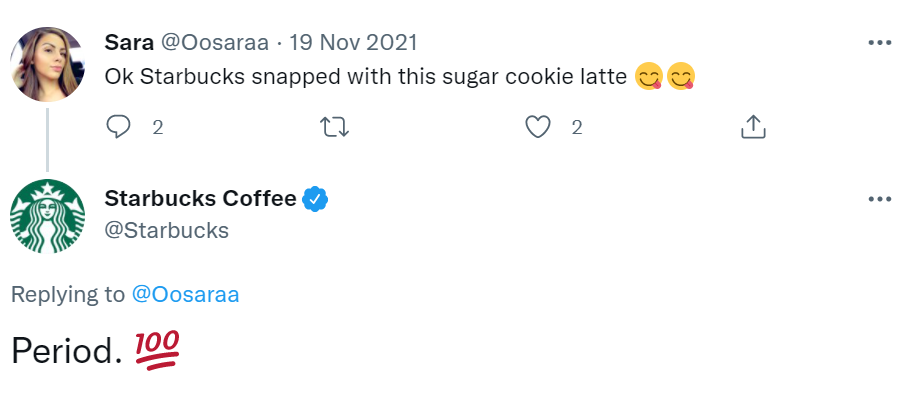
Starbucks

A great example of it is the following post, where Starbucks was not tagged with its official twitter handle, yet the brand was able to identify it online thanks social listening and respond to it, thus improving their customer engagement.

2) Empathize with the audience & respond fast

The audience needs to feel that they are being heard.

And in order to do that, the brand needs to engage a little more with its audience. Be it negative or positive, the brand needs to empathize with the audience.

brand gets positive feedback

If a brand gets positive feedback, then it needs to figure out what the audience loved about it and build marketing campaigns on that basis. And if the brand gets negative feedback, it needs to know the pain point of the audience in order to solve it.

3) Choose the right listening tools!

As kids, everyone is taught how active listening is important, but when it comes to brands, they haven’t always had the right tools to do so at a large scale. But now, there are many that can help brands in collecting and analyzing data in an easier way. Here are some that work across major social media networks:
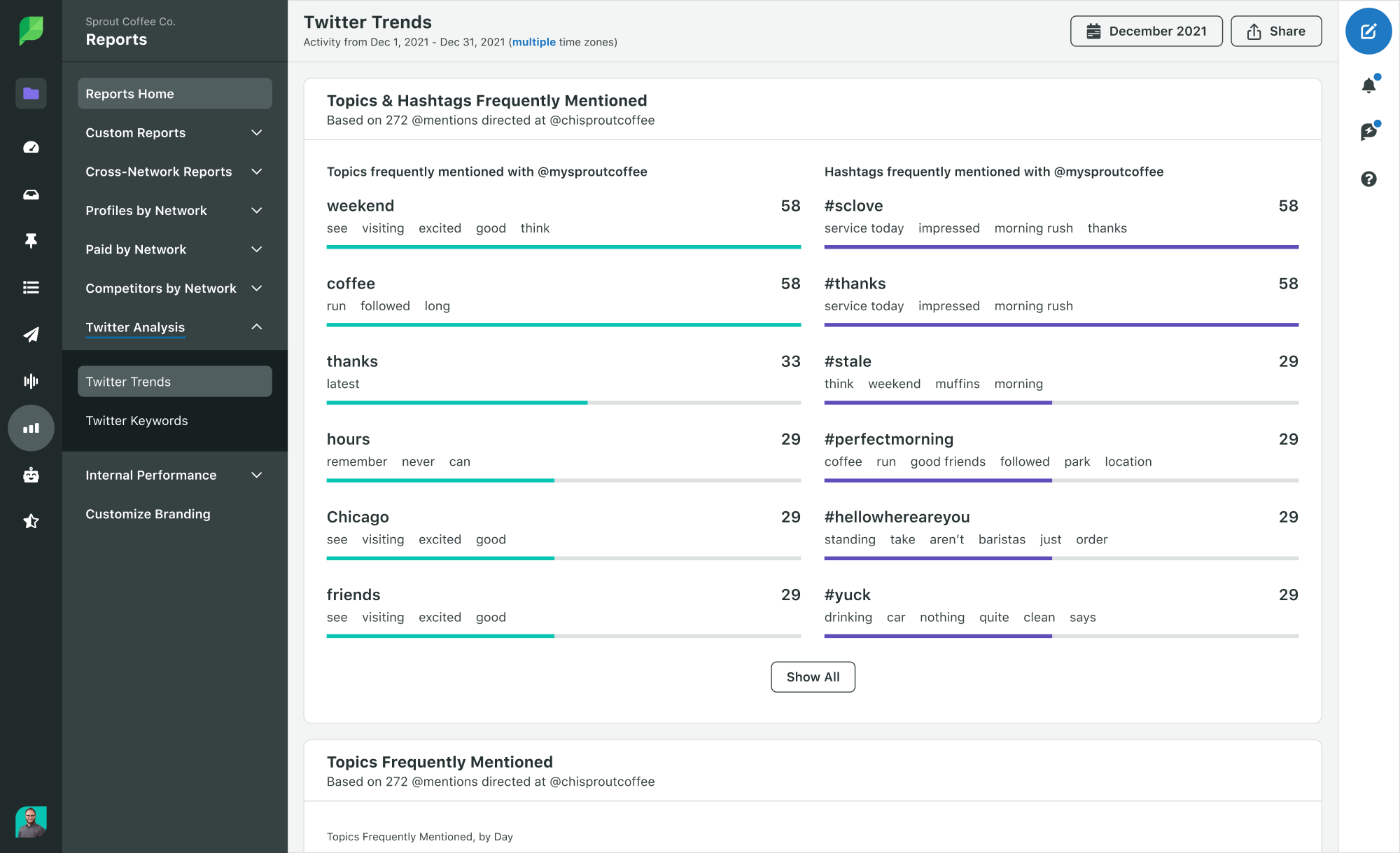
Sprout Social Report

Sprout Social:

This tool provides brands with in-depth analytics and insights for organized social listening. One of its features shows the hashtags and topics that are trending across the mentions of the brand and replies on behalf of the connected brand. The name of the people and brands that most frequently talk about and get mentioned with a particular brand surface on the tool.

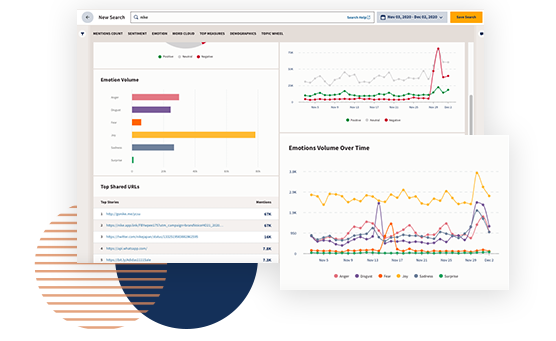
Hootsuite:

Brands can use this tool to monitor conversations, keywords, and mentions, along with hashtags, and respond to them. The tool helps a brand to analyze many real-time conversations taking place on digital platforms.
Hootsuite

HubSpot:

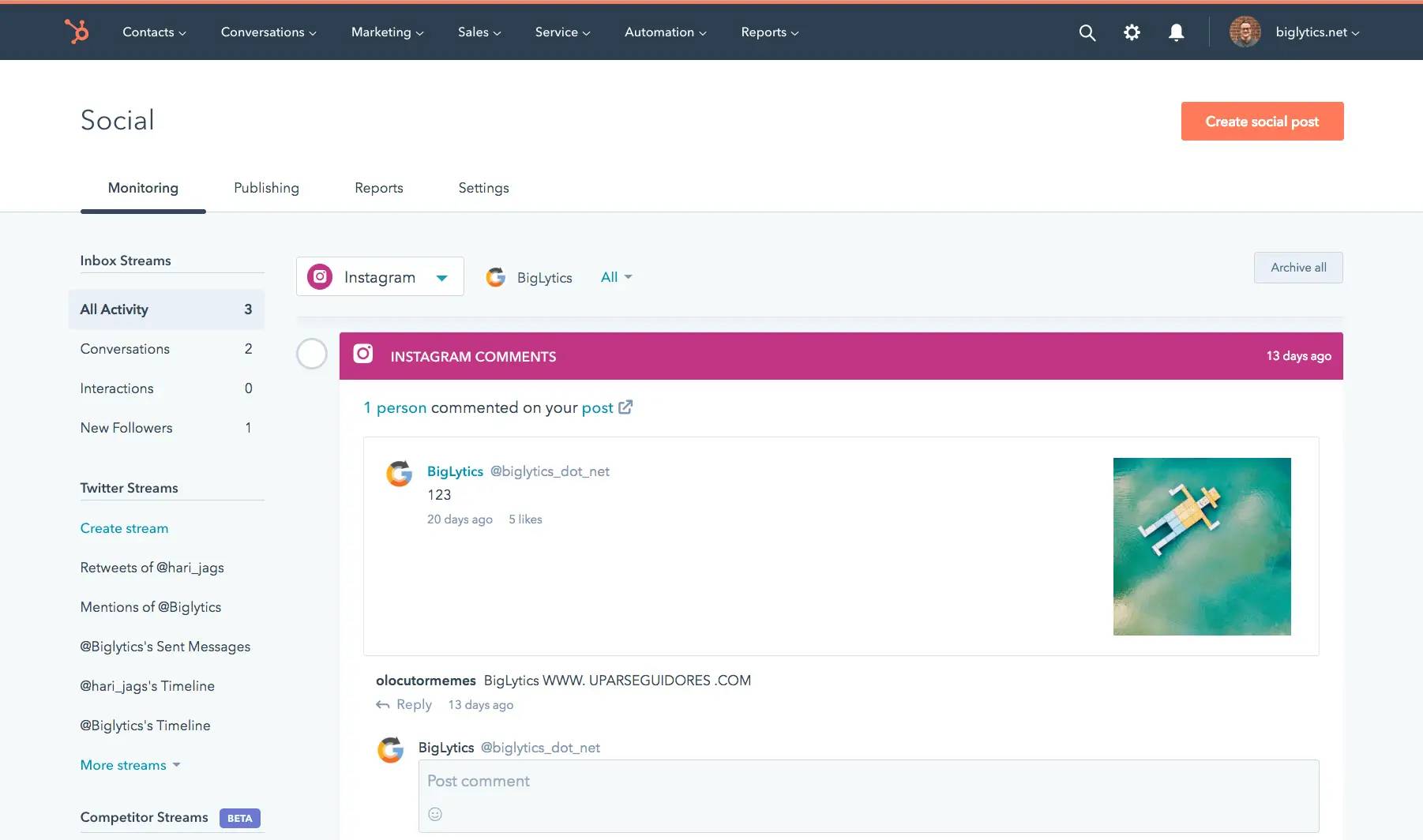
hubspot report

Brands can monitor social interactions and connect with the right people. It allows a brand to link data from social media with contacts in their database in order to create custom keyword monitoring, email alerts, mention notifications, etc.

Other than these, there are tools like Lately, Brand24, Brandwatch, Buffer, TweetDeck, Mention, which come with comprehensive features to help brands collect brand mentions across major social media networks.

As one of the top full-service digital agencies, Flora Fountain provides digital marketing services in Ahmedabad, India, and across the world. Drop us a message to plan some insightful social listening strategies for your brand.

Categories
Content Writing

5 ways of getting creative with professional content writing for SEO

A common misconception among writers in this age of digital is that creative content writing and SEO content writing just don’t go hand in hand. But we, somewhat controversially, believe they can co-exist! HOW?!

First, let’s get some clarity on the basics.

  • What is SEO (Search Engine Optimization) Content Writing?

Creating readable content for the web that ranks high on search engines, through the use of relevant keywords in the main body and the meta tags and title, multiple headers and bullet points within the article to break down the content, and interlinking them with other relevant articles and pages.

  • What is Creative Content Writing?

This is where imagination takes flight and originality, the front seat. This is where a story is narrated to the reader, engaging them with every line, a chuckle here, maybe a gasp there, keeping them hooked till the end, delighting them with a conclusion that leaves them wanting more.

Now you might be wondering, how does one merge these two seemingly different schools of thought into a single piece of writing? Well, here’s how.

Know your keywords

One of the most common feedback website writers get is that their content does not have any of the keywords the client wants. This is a common problem when the blog is written by a separate team of content writers, only after which the SEO team kicks in for checking the SEO compatibility. Instead the SEO expert and content writer must work closely, right from the blog’s ideation to checking the keywords before its eventual publishing.

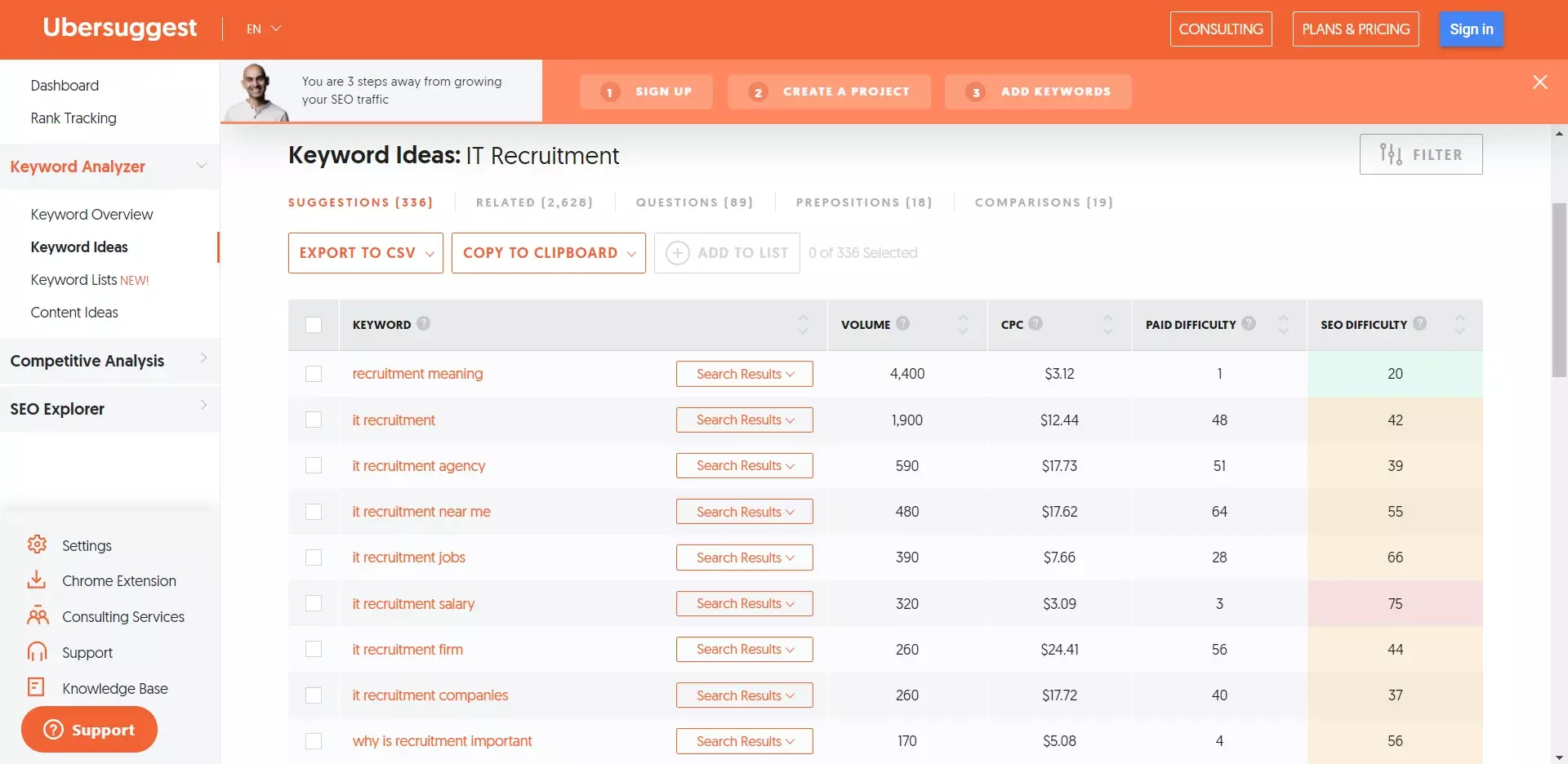
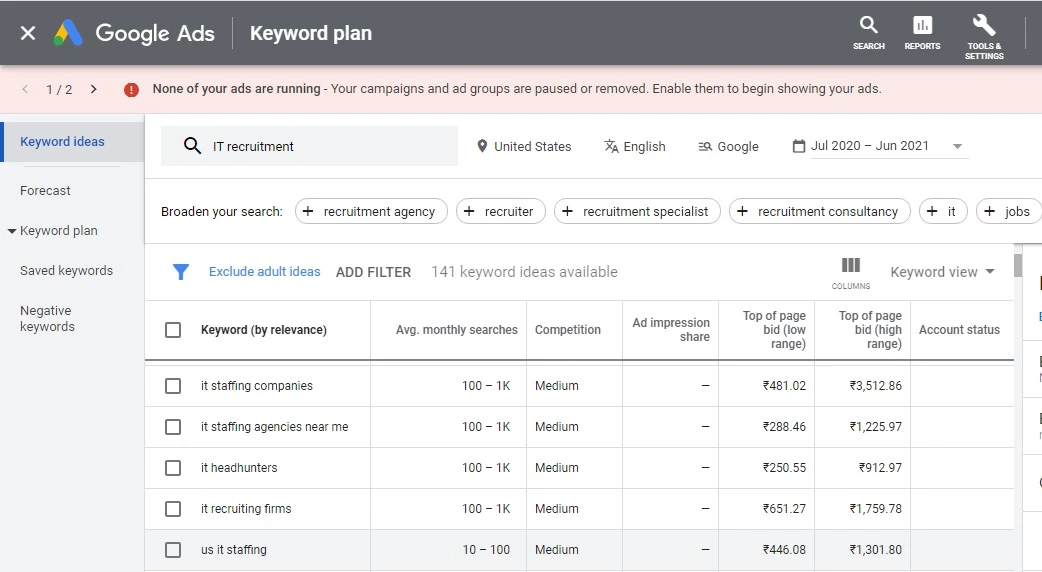
To elaborate, the team must first identify the keywords for a few months, as well as, the target audience. This is usually done by the SEO expert. Once done, these keywords are provided to the content writer and together the two can create a calendar of topics for anything from a month to 6 months! In case you don’t have an SEO executive and are operating as a solo writer, you can use tools like Google Keyword Planner, Ubersuggest or Moz.

Flora Blog chat

Enter the name of the industry or the topics you’re planning to write on, and the tool would suggest multiple keywords with their performance, relevance and ranking data too.

Flora Blog

Keep it simple, silly!

Google cares for keywords. But the reader doesn’t look for SEO keywords, but for something that will keep them engaged, intrigued and delighted.

If the content is crisp and short and provides the reader with value as information or entertainment, the targeted audience is usually hooked. One of the best ways to do crisp writing online is through Listicles. Our minds have become trained to at least skim through an entire list, rarely leaving in the middle. And if something is interesting, we spend more time reading the copy, increasing the time spent on the website.

Moreover, overly complex, long sentences, peppered with repetitive words and phrases are a turn off not just for the reader, but Google too while ranking content for its search engine.

This is because search engines rank content that provide answers to the question asked by the viewer. The simpler and clearer the content is, the better chance it has to get ranked higher on the search window. Keep in mind, you are eventually writing for an actual person with an actual problem. The search engine is just the bridge between you and the reader.

  • Keep your sentences short
  • Highlight the topic using H tags
  • Provide answers
  • Make it easier still, use bullet points

(See what we did there?)

And to help with the SEO, apart from using a keyword or two in the copy, link them to a relevant source that backs your idea/solution.

With attention spans getting lower and so much content being available to us online, these tips help the reader keep engaged with the content instead of just skimming away.

Use relevant imagery with Alt Tags

Remember how we all loved comic books as kids? Remember, how our least favourite book in school would be the Math textbook?

Know why? Comic books were full of exciting imagery with captions, while that Math textbook was just a series of long explanations, confusing numbers and no pictures at all.

By adding great pictures, well designed artwork and fun GIFs to your blogs, you’re not only adding relevance to the content, but also keeping the reader hooked to see what comes next, kind of how Pixar does it.

And what’s more, images help with SEO too. Of the 5.4 billion searches done on Google every day, millions of them are for images and videos. When you insert pictures and embed videos within your content with the right Alt Tags, they get pulled up on top, bringing the blog along with it.

Flora august blog

Play a little … with Meta titles, headers, descriptions

Content teams are known to show little or no interest when it comes to “creating metadata” for their blogs. As they believe it is their writing that’s the hero here.

Ironic given that it is after all through the Meta Title, Headers and Meta Descriptions that people find the heroic content online. After all, what is the point of writing a riveting piece, if the audience it is meant for is unable to find it online?

But it doesn’t have to be all dry and clinical. There are great ways to soup up your meta content with the keywords. For example, when writing the meta description for this very article ::

Usual SEO Content Writing“SEO content writing for websites and blogs can be creative. Here is how to write creative website content writing with the help of professional content writing services such as the ones provided by Flora Fountain”
Creative SEO Content Writing“Writers often lament that creativity was murdered by SEO on the Internet, when it comes to professional content writing. But we somewhat controversially believe that creative content writing and SEO content writing can co-exist peacefully … without crying murder”

The first is a very basic way to write a Meta description for this blog. While the second one does the same thing with a fun spin.

Meta data such as titles, headers and descriptions are the perfect vehicles for your keywords in, and the first place search engines look for when trying to index the content.

Whether it is website content, blogs or articles, here are the bits of meta information to ALWAYS have in each page of your online content:

  • Meta Title of 50 to 60 words with your main keyword in it (Usually with a figure in it)
  • Meta Description of 155 to 160 characters
  • Multiple Headers consisting of 6 to 8 words
  • Slug with all the keywords

Maintain the minimum quantity

How many words in a blog is enough? This is another point where the Team SEO and Team Content Writers can get into conflict. While writers seek creative freedom to write as much or as little as they want to express their ideas, SEO experts suggest that an ideal blog must be at least 800 words long.

Why? Because it gives enough room for both, the writers to let their creativity flow and the SEO experts to embed their keywords within.

Also, a short blog that ends abruptly leaves the reader disappointed as he/she feels that they’ve been left hanging. While a long blog makes them drift away and drop the blog halfway.

And here’s a fun fact, an average reader takes only about 3 minutes to read 800 words. Writing content being mindful of this fact, while keeping all others in mind, is the only way to write engaging content that ranks high! This is a practice followed by some of the best digital agencies all over the world, and definitely one of the reasons why Flora Fountain is known as one of the best professional content writing agency in Ahmedabad

So writers, make sure you follow these points while writing and working in tandem with your SEO team. Or, simply drop us an email and let the content experts of Flora Fountain do it for you!

Categories
Ecommerce

Shopify, WooCommerce or Magento: Which is the right ecommerce platform for your online store?

Looks like you’ve decided to go digital and sell online! Congratulations! It’s a big step.

But a lot of things right at the start might confuse you. For starters, which ecommerce platform should you start your online journey with? This year everyone seems to be raving about Shopify, last year it was WooCommerce and then someone told you about Magento too. The more you speak with ecommerce website development or digital agencies, the more options there seem to be and the more confusing it gets.
So here’s a definitive guide to understand the pros and cons of using each of these 3 major ecommerce platforms, depending on what, how much and who you are selling to…

So, what is Shopify?

While it might seem new, Shopify has been around as an ecommerce platform since 2007. Despite being a paid only solution, it is the second most popular ecommerce platform with about 20% of the market share. A major reason behind this is that it is a software-sold-as-a-service, which means you don’t have to be a coder to set up a Shopify store.

And Magento?

Magento is the big daddy of customizable e-commerce platforms. It has two services, a free Open Source and a paid Magento Commerce, which like Shopify comes with hosting services. With about 500,000 users, Magento has 10% of the online market, including bigger brands that are into serious online retail of clothes, jewellery and even cars.

And finally we come to WooCommerce?

With 29% of the market share, WooCommerce is the most widely used e-commerce platform. It is actually a plugin for WordPress that extends the functionality of this very popular CMS into an online store.
Still wondering which platform to pick? Read on…

Ease of use

This one is especially important for small business owners, as they end up initially doing a lot of the work on their own.

Ease of use

Of the three, Shopify is the easiest to set up and use. It comes with a managed hosting solution, well-designed themes both free and paid, PCI compliance for payments, and a host of shipping solutions already built by logistics companies – all of which can be integrated without coding knowledge. This means all you have to do is buy a domain, connect it with your Shopify account, select a theme, upload products and get ready to sell online.

This one is especially important for small business owners, as they end up initially doing a lot of the work on their own.

WooCommerce on the other hand requires the user to have their own hosting solution, which needs to be purchased before getting started. So you have to buy your own domain, hosting solution, install WordPress and WooCommerce, before you can start customizing themes or entering products. This makes it not quite as easy as Shopify, however, it does give you more choice in selecting your own server. Because of a vibrant community, WordPress also has a wider selection of free and paid themes available online.

Magento is the platform of developers. While it has its own hosting solution, you can also use the Open Source version and connect it with a server of your choice. Getting Magento set up and customizing it requires developers who have knowledge of PHP and HTML.

Customizability

Customizability is almost inversely proportional to ease of use in this case. With Shopify being the most closed platform and offering the least customization. One can customize CSS for the look and feel of the website and use existing app or create new Shopify apps for certain limited customization. Several workflows like the cart page can not be customized at all in the starting plans.

Customizability

Magento, on the other hand, allows for the most customization from the product page to the payment workflow to the user profiles. For some common functionalities, Magento addons are also available in the marketplace. This is the reason most bigger brands that take online retail seriously, choose Magento.

WooCommerce is also fairly customizable, since it sits on the open-source platform of WordPress that is supported by a thriving community. Most of the features you might want to add are already out there as free or paid extensions to the plugin, created either by WooCommerce creators or the WooCommerce community.

Scalability

Scalability

Magento and Shopify are slightly better suited for large databases of products since they are e-commerce first platforms. With Shopify, while adding products does not impact performance, scaling up does become more expensive as your store grows with more users and transactions.

Scalability of products with WooCommerce is possible, however, since it was created as a content platform, adding too many customizations or products without thoughtful technical architecture can impact performance and slow the website down. As a result, you have to hire WordPress developers who are familiar with optimizing the platform as you scale up.

Security

Shopify’s hosting comes with an SSL certificate and PCI compliance making it watertight and secure. With WordPress and Open Source Magento, you have to purchase your own SSL certificate and keep updating any security patches or extensions that the two platforms release from time to time. This is a fairly common practice for most open source software, so it is not a major concern, however, it does require developer help.

Security

SEO Friendliness

SEO Friendliness

Shopify comes with basic SEO support with the ability to add meta tags, image alt text, generate 301 redirects, automatic XML sitemaps and a blogging feature. However, customizing any of this in the basic plan is not possible.

WooCommerce comes with all the above plus the ability to integrate with mature SEO plugins like Yoast for that extra boost to your store’s SEO, by adding keywords per page, real time suggestions for keywords and more!

Magento being the completely customizable platform that it is allows you to define your own SEO strategy and customize the backend to support all of the above features in Yoast and then some, like canonical tags, Google sitemaps, no follow links and literally anything your SEO expert desires.

Support

Being a paid platform, Shopify has quite an attentive and prompt 24×7 support desk available over email for all plans. It also has a pretty comprehensive documentation and, being the second most-popular platform, a thriving community of developers.

WooCommerce has possibly the biggest community of developers helping each other and clients out. One of the benefits of such a community for smaller businesses is that you can hire a WooCommerce developer for parts of the project or some specific functionality quite easily from these forums.

Support

Moreover, pretty much anything you imagine in WooCommerce has probably already been done and put out as a plugin by someone in the community!

Magento is a mixed bag. While Magento Open Source has a community like WooCommerce, Magento Commerce provides prompt support for its paid users, similar to Shopify.

Pricing
Pricing

Shopify provides three different plans ranging from $29 to $299, which includes hosting services. If you are going for a paid theme, this can cost anything up to $180. And finally, there is a transaction fee anywhere from 0.5-2% depending on your Shopify plan. This makes it ideal for a beginner user, but a little more expensive as you scale up and increase your transactions.

WooCommerce and WordPress are essentially free of cost, however, you end up paying for your own server and SSL certificate. Any plugins required for additional functionality should also be factored in.

Magento Open Source is similar to WooCommerce in being open source and requiring server and SSL. Magento Commerce however is for serious online players since its licensing fee starts at $22,000.

The Final Word

To conclude, if you are just starting out online with a limited monthly budget and a whole lot of DIY spirit Shopify is perhaps your best bet. You can play around with themes, make minor changes to the look and feel, add a payment gateway, integrate with a shipping provider, add products and get started within a few weeks, even days.

However, if you plan to build a slightly more customized website and have the financial bandwidth to hire 1 or 2 developers, WordPress with WooCommerce, can work better for you.

For bigger organizations with a long-term online vision, thousands upon thousands of customized products and a free hand with budgets, Magento is the most future proof and customizable solution.

Need more guidance getting started with setting up your own e-commerce store? Get in touch with Flora Fountain, we are good listeners and even better problem-solvers for all your digital marketing and e-commerce needs. Call now, for a free consultation for your online business.