Categories
SEO

The Longer the Better! Why Long-Form Content Is Crucial To Effective SEO

No two writers will ever agree on the same answer when it comes to long-form content. One argument we as an SEO company offering digital services in Ahmedabad constantly battle with, is that given that the attention span of netizens is getting shorter, we must write shorter, crisp content.

But, what about the readers who wish to attain complete information, in detail from us? And of course, it will hamper the SEO activity since short-form content will never be able to touch the minimum length requirements for it.

Let’s try and understand what exactly do we mean when we say long-form content, and why it still holds importance in content marketing.

What is long-form content?

content marketing experts

There have been multiple definitions of long-form content. While some claim that any blog that crosses the threshold of 700 words is long-form, content marketing experts suggest that informative articles that are more than 1200 words are considered long-form content.

Flora Fountain’s SEO experts have always believed that any blog or article that wishes to rank higher on the search pages, must be of minimum 800 words, and should have all the relevant keywords.

And writing long-form content comes with a plethora of benefits for brands that wish to grab as much attention it wants on the internet. Here’s how…

Gain more backlinks
Backlink
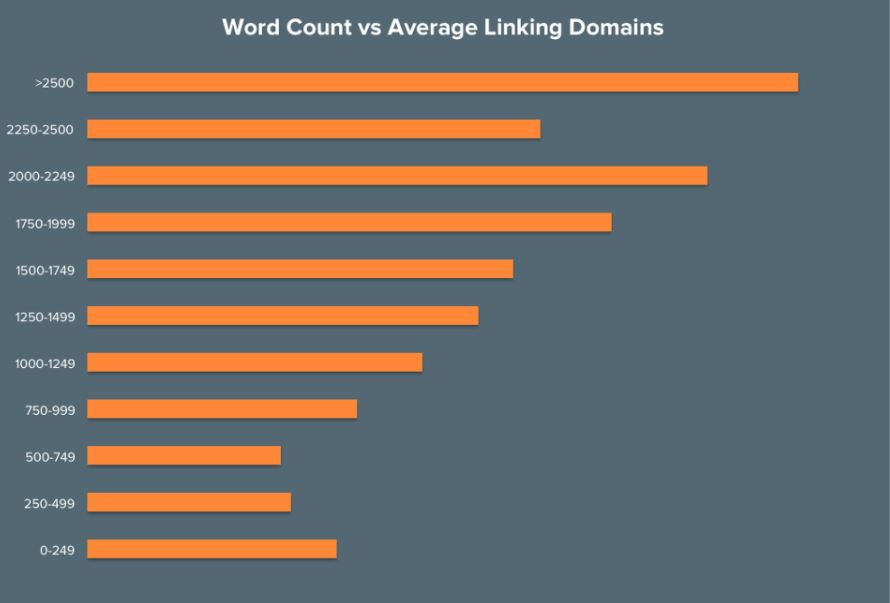
HubSpot graph showing the correlation between content length and backlinks

Google prefers high-quality content and link-building to rant any website on the search engine results page (SERP). And long-form content has a greater probability of earning quality backlinks.

HubSpot, in its research The Anatomy of a Shareable, Linkable & Popular Post found that articles with a word count of over 2500 words earn the most links. Short content on the other hand has 75% fewer backlinks than articles of average length (900–1200 words).

Drives traffic to the site

SEMrush further studied over 700,000 articles to come to a conclusion that articles with more than 3000 words generate 3 times more traffic than articles with 90-1200 words. In another study, HubSpot found that articles with 2,250 to 2,500 words earn the most organic traffic.

Here’s another fun fact that we came across. Founder of NP Digital and prominent digital marketer Neil Patel had clocked over 100,000 visitors every month in the first year itself of launching his website Neil Patel. Wondering how? Well, obviously his content is rich with data, facts and detailed knowledge about digital marketing, but apart from that, his blogs are anywhere close to 4000 words.

The point we’re making here is that when you write quality content in long-form, using the keywords strategically, search engines will definitely rank you higher and drive traffic towards your website.

Raises Click-Through Rate

Click-through-rate (CTR) is the ratio used to gauge how the keywords, advertisements and SEO listings are performing. A simpler way to explain this, is that the number of clicks an ad receives is divided by the number of times it is shown to people online. For instance, if an ad is shown to 100 people, and 5 of these people clicked on the ad, its CTR is 5%.

Search engines use this data to see if a page on a website is informative enough to the users or not. Less clicks means the page is not able to fulfill users’ query. So, they move the page down in the search rankings.

And when writing long-form content, it gives enough room to write compelling headers, description tags, and place multiple keywords on strategic locations of the write-up. These smartly written titles, headers and descriptions, peppered with keywords entice the user to click on it when shown of the SERP. And once pulled in, it can also reroute them into exploring the multiple offerings and pages on the site.

Increases dwell time

Dwell time is the amount of time any visitor spends on a particular site. This metric shows Google if a website or any page on the website is worth spending time on or if that page is fulfilling the needs of the user. If a website has a short dwell time, Google finds it irrelevant to the search query.

Long-form, good quality content gets more eyes on the page. It increases the dwell time as people stay on the page for a longer period of time.

Tips to write long-form content

  • Avoid writing in long-drawn sentences. Break down the information into shorter sentences and then place them into a paragraph.
  • Try listicles (Thank you BuzzFeed). People LOVE lists! Instead of big blocks of paragraphed content, list out the points and write shorter descriptions for them.
  • Set a flow for the content. For instance, decide a specific number of words for the opening, the introduction to the topic. Number the bullet points that cover the soul of the story and again fix a specific number of words for description of each.
  • Add source links to every study and research quoted in the article, helps with the back-linking.
Categories
SEO

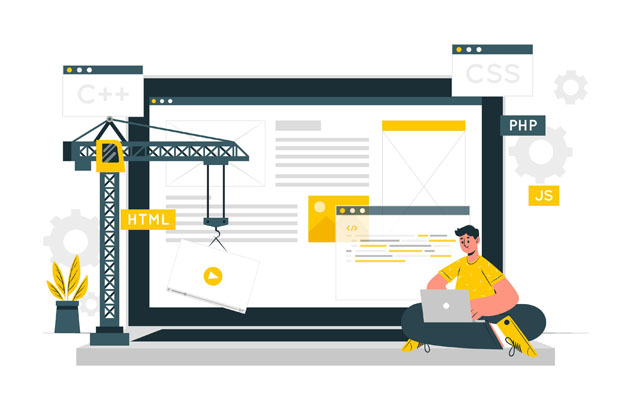
Here’s How to Retain SEO Ranking even after a Website Redesign

SEO (Search Engine Optimisation) Rankings are sensitive and are prone to changing every time there is a change in the design or content of the website without planning for SEO. During a website redesign or redevelopment, there is a high risk of the website losing its organic traffic, rankings and sales.

While there are plenty of blogs and conversation online revolving around how to make a website rank higher up on the search engine results pages (SERP), very few talk specifically about maintaining those rankings, even in the event of a redesign on the website. So, let’s talk about retaining a website’s rankings on the SERP after a redesign on the site and look at some of the tips shared by the SEO experts at Flora Fountain, a digital agency offering SEO Services in Ahmedabad.

search engine optimization

Save the original website’s data first

One of the ways to ensure website’s rankings don’t suffer heavily is by maintaining a similarity in the flow of content and design of the old site. Because search engines rank those pages or websites higher that are easy to navigate. It is important to save the old or current website’s data, i.e. a list of all the pages, its URLs, important pieces of content, keywords and the sitemap for future reference. It helps the developers and designers to ensure the user experience doesn’t get disturbed on the redesigned website.

Don’t make changes on the live site

This is an important point to remember. While making changes or during the redesigning process, the website must be disabled. The updated version should be made live only after testing. But disabling a website means the business will lose many customers and visitors who might be trying to access the site. It is advised to do it on a different domain. Experts providing top SEO services in India suggest that all the changes and updates should be made in a different domain or a staging site, and once all the changes provide satisfactory results in testing, only then the new site be swapped with the old one live on the internet.

Use 301 Redirects

301 Redirects

When there is a change in the URLs, make sure to have 301 Redirects for them. The 301 Redirects notifies the search engines that the content has been shifted to a new location and takes the visitors to the new web page from the old one.

A broken link can damage the ranking of the website, which will eventually lead to losing organic traffic to the website. This happens because the search engine assigns the existing ranking to the new page only after it knows that both the pages have the same content in them.

Check for broken links

Even upon setting up 301 redirects for the pages, problems can still arise. Broken links can show up if there is a mistype or a spelling error in the URLs. And when this happens, visitors and search engines will see a page with the message “404 Page Not Found”. This again creates a bad experience and can be a serious turn off for the visitors. This error damages user experience and search rankings of the website as well.

Look for broken links on the website by using tools like Screaming frog, Bing Webmaster, Broken link checker and Yandex Webmaster.

404 Page Not Found

Reinstall SSL Certificates

Redesigning a website can result in loss of the site’s Secure Sockets Layer (SSL) certificate. And websites with SSL certificates have added advantage on the SERP. Safety and data privacy play an important role in ranking of a website as it gains people’s trust. SSL creates an additional layer of safety that protects the information people choose to share with a website. In other words, it is a protocol used to encrypt communications.
So, every time there is a redesign on the website, it is important to reinstall all the SSL certificates to ensure that the new site starts ranking up on the SERP quickly after going live. Here’s a easy to understand tutorial on how to install SSL certificates on the website

Update the Sitemap

The sitemap is an XML file that’s contains a list of the website’s URLs which helps search engines to know about the pages of your website for crawling. While redesigning a website, it is recommended to create a new sitemap XML document, as it helps search engines to index the website faster. Moreover, it allows site visitors to easily navigate it. An XML sitemap can be submitted to search engines such as Google, Bing, etc. through webmaster tools like Yoast or Sitemap Generator.

Update the Google My Business page

This might sound like a small step, but it is a crucial one. As soon as the updated website is live, the first thing to do is make changes to the Google My Business Page of the business.

Google My Business is an effective tool for businesses to use to improve their local search rankings. It can give local service-based businesses the exposure they need to be at the top of the SERPs in their area.

You don’t want to sabotage your SEO rankings while redesigning the website, do you? Let the Best Digital Agency in Gujarat help your business in retaining them. Drop us a message on hello@flora.ffteam.in